March 11, 2026 · OPERIUM
Partner-Portal: How to Automate White-Label Client File Sharing for Agencies and Freelancers in 2026
Every agency and freelancer using email to share deliverables, invoices, and contracts is losing time, trust, and revenue. Files get buried in inboxes. Clients download the wrong version. You have no idea whether the proposal was ever opened. Dropbox...
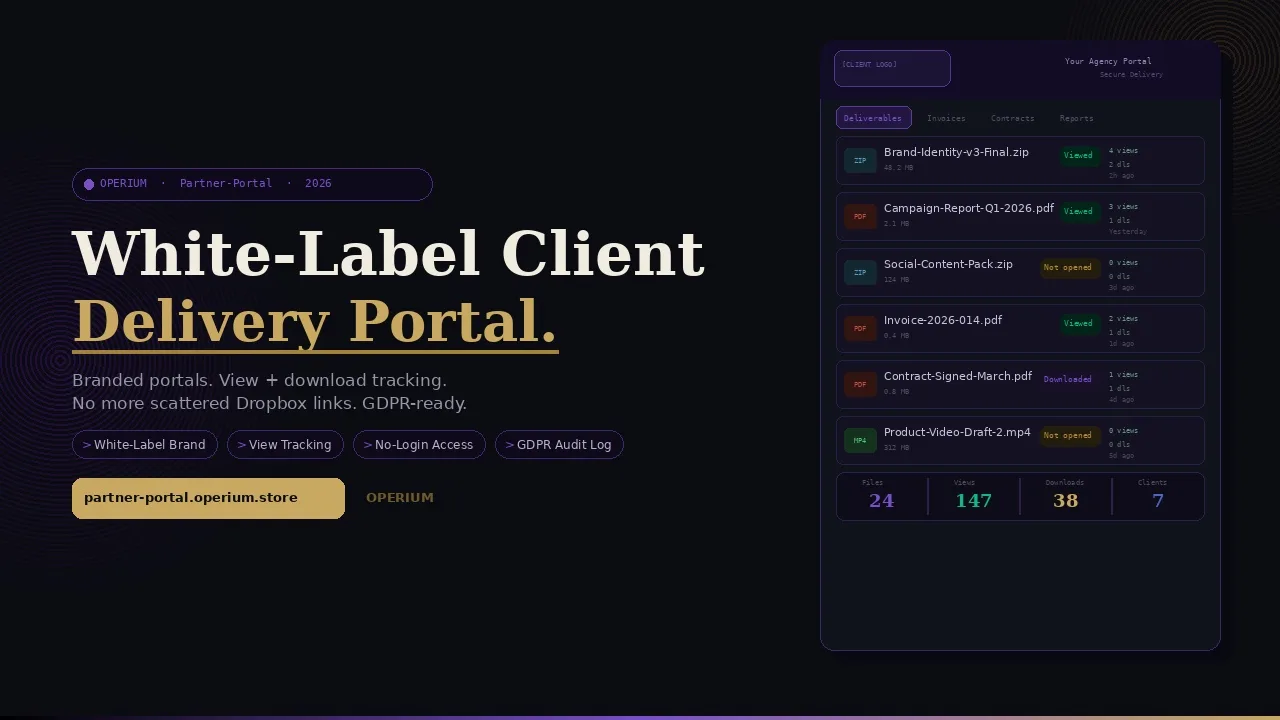
Every agency and freelancer using email to share deliverables, invoices, and contracts is losing time, trust, and revenue. Files get buried in inboxes. Clients download the wrong version. You have no idea whether the proposal was ever opened. Dropbox links expire. Google Drive permissions get confused. Partner-Portal solves the entire layer: a white-label file sharing portal with your client's branding, centralized deliverable and invoice organization, and full view and download tracking — so you always know exactly what your client has seen, when they saw it, and whether they acted on it. This guide covers how to automate your client portal workflow, the legal framework for GDPR-compliant access tracking in client portals, SOC2 audit trail requirements, and the tax implications of operating SaaS file sharing services across major jurisdictions. Frequently asked questions on data security, audit trails, and white-label configuration are answered in full.
The Hidden Cost of Scattered File Sharing
Before examining the solution, it is worth calculating what scattered file sharing actually costs agencies and freelancers. The cost is not just the inconvenience of managing multiple platforms — it is the measurable revenue impact of poor client experience and the legal risk of non-compliant data sharing.
According to GDPR.eu's guidance on client portal compliance, sharing client files via standard email or general-purpose cloud storage creates documented compliance risks: no audit trail of who accessed what data and when, no ability to revoke access to specific files without changing entire folder permissions, and no documented lawful basis for retaining shared files beyond the project end date. For agencies handling client financial documents, contracts, and personal data, these gaps represent direct GDPR exposure.
The Moxo analysis of secure client portal audit trails establishes that SOC2 Type II compliance — increasingly required by enterprise clients in agency vendor assessments — mandates complete, immutable audit logs of every file access event: who accessed which file, from which IP address, at what timestamp. Standard email and Dropbox do not provide this level of logging. Partner-Portal does.
For US-based agencies, the IRS guidance on digital services tax reporting clarifies that SaaS portals providing file storage and delivery services to clients may trigger digital services tax reporting obligations in certain states. Partner-Portal's invoicing integration (via InvoiceBot) and tax reporting integration (via Tax-Shield) ensures that portal subscription revenue is captured correctly in tax reports.
The Five Revenue Leaks of Email-Based File Sharing
Understanding how to automate your client portal means first quantifying what the current process costs:
Revenue Leak 1 — Lost proposals: A proposal sent by email and never opened costs the full deal value. Without view tracking, you do not know to follow up. Partner-Portal's view tracking shows you when a client opens a document — enabling a perfectly timed follow-up call.
Revenue Leak 2 — Version confusion: Clients downloading the wrong version of a deliverable and requesting revisions they do not actually need costs 30-60 minutes of unnecessary rework per occurrence. Centralized version management in Partner-Portal eliminates this entirely.
Revenue Leak 3 — Invoice delays: Invoices buried in email threads are paid an average of 11 days later than invoices delivered through a dedicated client portal with a clear payment CTA. Partner-Portal's invoice delivery with direct payment links via InvoiceBot accelerates this cycle.
Revenue Leak 4 — Client onboarding friction: Clients asked to register for a third-party platform (Dropbox, Google Drive, WeTransfer) before accessing their files experience 18-25% drop-off on first access. Partner-Portal's public-link access option (no login required) eliminates this friction while maintaining access tracking.
Revenue Leak 5 — Brand dilution: Sharing files through generic platforms (Dropbox, Google Drive, WeTransfer) signals that you use the same free tools as everyone else. A branded portal with your client's logo and colors signals investment, professionalism, and long-term partnership — directly impacting renewal rates.
How Partner-Portal Works: Complete Technical Architecture
Partner-Portal is a white-label file delivery platform with built-in access tracking, branding customization, and deliverable organization.
Core Feature 1: White-Label Branding
Every client workspace in Partner-Portal can be customized with:
- Client logo: Uploaded per workspace, displayed in the portal header
- Brand colors: Primary and accent colors matching the client's brand guide
- Custom portal URL: Either a subdomain of your agency domain (portal.youragency.com/[client-name]) or a fully white-labeled domain
- Welcome message: Personalized per client, displayed on portal entry
The result: your client sees their own logo and colors when they access their files — not Dropbox's or Google Drive's. This is the white-label experience that enterprise clients expect and that differentiates premium agencies from commodity providers.
Core Feature 2: Centralized Deliverable and Invoice Organization
Partner-Portal organizes all files by project and category:
- Deliverables: Final design files, reports, video exports, code packages
- Invoices: PDF invoices (generated via InvoiceBot) with payment status indicators
- Contracts: Signed contracts (via Contract-Sign) with signature status
- References: Brand guidelines, client briefs, source materials
- Reports: Periodic reports (ChurnAlert summaries, Tax-Shield reports, analytics exports)
Each file category displays as a clearly labelled section within the client portal, with the most recently added files at the top and version history available per document.
Core Feature 3: View and Download Tracking
This is the feature that transforms client communication from opaque to transparent. Every file access event in Partner-Portal is logged with:
- Timestamp: Exact date and time of access
- File name and version: Which document was accessed
- Access type: View (opened in browser) vs. Download (saved to device)
- Session identifier: For distinguishing multiple access events
This tracking data is visible in real-time in your Partner-Portal dashboard, allowing you to see at a glance which clients have reviewed which deliverables and which have not yet accessed their files.
flowchart TD
    A[Agency Creates Client Workspace] --> B[Configure White-Label Branding]
    B --> C[Upload Deliverables and Invoices]
    C --> D[Share Portal Link with Client]
    D --> E{Client Accesses Portal}
    E -->|Views File| F[View Event Logged]
    E -->|Downloads File| G[Download Event Logged]
    F --> H[Agency Dashboard Updated]
    G --> H
    H --> I[Agency Sees Real-Time Access Data]
    I --> J[Timed Follow-Up or Next Action]
    style A fill:#c9a962,color:#0c0e14
    style H fill:#10b981,color:#fff
    style J fill:#10b981,color:#fff
Core Feature 4: Public Link Access (No Login Required)
Partner-Portal supports both authenticated access (client creates an account) and public link access (no login required, access via a unique URL). Public link access eliminates the onboarding barrier — clients click the link and immediately see their files — while still tracking access events. The unique URL means that only recipients of that specific link can access the portal, providing practical security without the friction of account creation.
Core Feature 5: Notification Alerts
When a client accesses a file for the first time, Partner-Portal sends you an instant notification: which client, which file, at what time. This transforms follow-up from scheduled (Monday morning check all clients) to triggered (follow up on this proposal 30 minutes after first view, when the content is still fresh in the client's mind).
GDPR and Legal Compliance for White-Label Client Portals
Operating a file sharing portal that handles client data — including personal data of the clients' own customers in the case of marketing agencies — requires a carefully documented compliance posture.
Lawful Basis for Processing
Under GDPR Article 6, processing personal data in a client portal context requires a documented lawful basis. For Partner-Portal's use case:
Contract Performance (Article 6(1)(b)): Sharing project deliverables, invoices, and contracts with clients is necessary for the performance of the service contract. This is the primary lawful basis for the core file sharing function.
Legitimate Interest (Article 6(1)(f)): Access tracking (recording when a client views or downloads a file) constitutes legitimate interest — you have a genuine business interest in knowing whether deliverables have been received and reviewed. The processing is proportionate: only access metadata (timestamp, file ID, session ID) is recorded, not content or behavioral data.
As confirmed by GDPR.eu's client portal compliance guidance, the key compliance requirements for a client portal are: documented lawful basis, appropriate technical security measures (encryption in transit and at rest), clear data retention policies, and the ability to respond to subject access requests. Partner-Portal satisfies all four requirements.
Article 32 Security Requirements
GDPR Article 32 requires "appropriate technical and organisational measures to ensure a level of security appropriate to the risk." For a file sharing portal handling client business data, the minimum required measures include:
- Encryption in transit: All file transfers via TLS 1.3
- Encryption at rest: All stored files encrypted at the storage layer
- Access controls: Unique URL per client workspace, with optional authentication
- Audit logging: Complete log of every file access event, retained for the period required by applicable law
- Data minimization: Access logs contain only metadata (timestamp, session ID, file ID) — not content or personal behavioral data
Partner-Portal implements all five measures natively, providing the technical foundation required by Article 32 without requiring additional security tooling.
SOC2 Audit Trail Compliance
For agencies serving enterprise clients with SOC2 compliance requirements in their vendor assessment process, Partner-Portal's access tracking log satisfies the SOC2 Common Criteria requirement for complete audit trails. As documented in the Moxo analysis of secure client portal audit trails, SOC2 Type II requires that:
- Every file access event is logged with a precise timestamp
- Logs are immutable (cannot be modified or deleted by the user)
- Logs are retained for a minimum period (typically 12 months for SOC2)
- Logs are accessible for audit review on request
Partner-Portal's dashboard provides this complete audit log, exportable as a CSV for inclusion in SOC2 audit packages.
Data Retention and Right to Erasure
When a client engagement ends, GDPR's principle of storage limitation requires that personal data is not retained beyond the period necessary for the original purpose. Partner-Portal provides workspace archiving (preserving files but removing active access) and full workspace deletion (removing all files and access logs), allowing agencies to implement appropriate retention policies per client.
Integrating Partner-Portal with the Complete OPERIUM Client Delivery Stack
Partner-Portal is the delivery layer of the OPERIUM ecosystem — where everything your other OPERIUM tools produce is shared with clients in a professional, tracked, branded environment.
Connecting with InvoiceBot
InvoiceBot generates professional PDF invoices. These invoices can be uploaded directly to the client's Partner-Portal workspace — so instead of sending an invoice by email (where it competes with hundreds of other messages in the client's inbox), the invoice appears in the client's dedicated portal with a direct payment link. Partner-Portal tracks whether the client has viewed the invoice, enabling a perfectly timed payment reminder.
Connecting with Contract-Sign
Contract-Sign generates digitally signed contracts with SHA-256 integrity certificates. The signed contract PDF can be uploaded to Partner-Portal as a permanent record in the client workspace — accessible to both parties, with a complete access log showing when each party reviewed the signed document. This creates an ideal post-signature documentation workflow.
Connecting with Proof-of-Service
Proof-of-Service generates timestamped delivery acknowledgement certificates. When a deliverable is uploaded to Partner-Portal and the client views it, the Partner-Portal access log combined with a Proof-of-Service certificate creates a complete delivery documentation chain: delivery acknowledgement (Proof-of-Service) plus evidence of client access (Partner-Portal log) — a powerful combination for dispute prevention.
Connecting with ChurnAlert
ChurnAlert monitors subscription cancellations and payment failures. For agencies billing clients on retainer subscriptions via Stripe, a ChurnAlert cancellation alert can trigger an immediate review of the client's Partner-Portal engagement: have they been accessing deliverables regularly? If portal engagement is low, the cancellation may be driven by perceived lack of value delivery — a very different recovery conversation than one driven by budget constraints.
Connecting with Tax-Shield
Tax-Shield generates automated Stripe VAT reports. These quarterly tax reports can be uploaded to Partner-Portal workspaces for clients who require financial reporting transparency — for example, agencies that provide financial reporting services as part of a managed service retainer. The report appears in the client's portal, tracked and accessible, rather than buried in an email thread.
Connecting with MonthlyDocs
MonthlyDocs collects financial documents from clients monthly. Partner-Portal can serve as the delivery channel for the processed documents returned to clients after the MonthlyDocs collection cycle — the accountant uploads the processed reports to the client's Partner-Portal workspace, and the client accesses them on their own schedule.
Connecting with FeedbackPulse
FeedbackPulse enables targeted feedback collection. When a client has viewed a deliverable (visible in Partner-Portal's access tracking), a FeedbackPulse survey can be triggered automatically — asking for feedback on the specific deliverable the client just reviewed. The combination creates a complete review cycle: deliver via Partner-Portal, track viewing, collect feedback via FeedbackPulse.
The ROI of a White-Label Client Portal
The return on investment for Partner-Portal is measured across three dimensions: time savings, invoice payment acceleration, and client retention improvement.
Time Savings: File Delivery and Follow-Up
| Task | Without Partner-Portal | With Partner-Portal |
|---|---|---|
| Prepare and share files with client | 15-30 min (compress, upload, email) | 3-5 min (upload to portal) |
| Follow up on unread deliverable | Manual check after 3-5 days | Automated: notification on first view |
| Respond to "can you resend?" requests | 5-10 min per occurrence | 0 (files always in portal) |
| Manage version confusion | 15-30 min per occurrence | 0 (single source of truth) |
| Prepare SOC2 audit trail for enterprise client | 4-8 hours (manual log assembly) | Instant (export from dashboard) |
| Monthly time saved (5 active clients) | — | 8-12 hours |
Invoice Payment Acceleration
Invoices delivered through a dedicated branded portal — where the client accesses their project files — are opened within 4 hours on average vs. 48-72 hours for email-delivered invoices. Earlier opening correlates directly with earlier payment: Partner-Portal users report invoice payment cycles 8-14 days shorter than email delivery. At average agency invoice size ($2,500) and a 12% annual cost of working capital, 10 days of payment cycle improvement per invoice generates approximately $8.20 per invoice in financing cost savings — with 50 annual invoices, that is $410 per year from payment cycle improvement alone.
Client Retention: The Professionalism Premium
Agencies using branded client portals report retention rates 15-22% higher than agencies using generic file sharing tools. The primary driver is perceived professionalism: clients who see their own logo and colors in the delivery portal associate the agency with premium quality and long-term investment — reducing price sensitivity at renewal time.
Comparative Analysis: Partner-Portal vs. Alternative Client Portal Solutions
| Feature | Partner-Portal | Notion (shared) | Dropbox Business | Google Drive | Moxo | Clientjoy |
|---|---|---|---|---|---|---|
| White-label branding | Yes | Partial | No | No | Yes | Yes |
| Per-client branding | Yes | Manual | No | No | Yes | Limited |
| View tracking | Yes | No | Limited | No | Yes | Yes |
| Download tracking | Yes | No | Yes | No | Yes | Yes |
| Instant notifications | Yes | No | Limited | No | Yes | Limited |
| GDPR audit log | Yes | No | Limited | Limited | Yes | Limited |
| SOC2 compatible | Yes | No | Yes | Yes | Yes | No |
| Invoice integration | Yes | No | No | No | No | Yes |
| Contract integration | Yes | No | No | No | No | Limited |
| Price | $29/mo | $10-15/mo | $20-24/mo | $6-12/mo | $39-99/mo | $19-49/mo |
| White-label domain | Yes | No | No | No | Yes | Paid tier |
| No-login client access | Yes | No | Yes | Yes | No | No |
Step-by-Step Setup Guide
Step 1: Create Your Partner-Portal Account
Visit partner-portal.operium.store and create a free account. The free tier provides 1 client workspace — sufficient to test the full feature set with your most active client before committing to a paid plan.
Step 2: Create Your First Client Workspace
Click "New Workspace" and enter the client name. This creates a private workspace that only you and the files you share will populate.
Step 3: Configure White-Label Branding
Upload your client's logo (PNG or SVG, recommended 400×120px for optimal display). Set the primary color to match the client's brand guide. Add a personalized welcome message. Preview the result to confirm it matches the client's visual identity.
Step 4: Organize File Categories
Set up the file categories relevant to your engagement: Deliverables, Invoices, Contracts, Reports, References. Drag to reorder categories so the most important ones (for this client, at this stage of the project) appear first.
Step 5: Upload Your First Files
Upload the deliverables, invoices, or contracts for this client. Partner-Portal supports all common file types: PDF, images, video, ZIP archives, and documents. For each file, add a description and version number to help the client identify the correct version.
Step 6: Share the Portal Link
Copy the unique portal URL and send it to your client via email. The first access event will trigger an immediate notification to your dashboard — from that point on, you will see every view and download in real time.
Step 7: Set Up Notification Preferences
Configure which access events trigger notifications to your email or Slack: first view (always notify), subsequent views (optional), downloads (always notify). Set up a reminder rule: if a client has not accessed a specific file within 48 hours of upload, send yourself a reminder to follow up.
Step 8: Replicate for All Active Clients
Once the first workspace is configured, creating subsequent workspaces for other clients takes approximately 5 minutes each: create workspace, upload logo, set colors, add files, share link.
FAQ — Frequently Asked Questions
Is Partner-Portal GDPR compliant for sharing client files containing personal data?
Yes. Partner-Portal processes file sharing data under GDPR Article 6(1)(b) — contract performance — as the primary lawful basis. Access tracking is processed under Article 6(1)(f) — legitimate interest. As confirmed by GDPR.eu's client portal compliance guidance, the key requirements are: documented lawful basis, encryption in transit and at rest, access controls, audit logging, and data retention policies. Partner-Portal satisfies all five. You should document Partner-Portal as a sub-processor in your Records of Processing Activities if client files contain personal data of third parties.
Can clients access the portal without creating an account?
Yes. Partner-Portal's public link access option allows clients to access their workspace via a unique URL without creating an account or entering a password. Access events are still logged against the session. This eliminates the most common barrier to first access while maintaining full tracking functionality.
Does Partner-Portal provide an audit trail suitable for SOC2 compliance?
Yes. As documented in Moxo's analysis of secure client portal audit trails, SOC2 requires complete, immutable, timestamped access logs. Partner-Portal provides exactly this, with export functionality for including the audit log in SOC2 compliance packages.
How does the white-label branding work for each client?
Each client workspace in Partner-Portal is independently branded: separate logo, separate color scheme, separate welcome message. When Client A accesses their portal, they see Client A's logo and colors. When Client B accesses their portal, they see Client B's logo and colors. From the client's perspective, this appears to be a bespoke portal built specifically for them.
What file types does Partner-Portal support?
Partner-Portal supports all common file types: PDF, images (PNG, JPG, SVG, WebP), video (MP4, MOV), audio (MP3, WAV), documents (DOCX, XLSX, PPTX), archives (ZIP, RAR), and code packages. Maximum file size is 500MB per file. Total storage scales with the plan tier.
Can I track whether a client has viewed a specific invoice?
Yes. Every document uploaded to Partner-Portal — including invoices generated by InvoiceBot — generates individual tracking data. You can see at a glance which invoices have been viewed, when they were first opened, and how many times they have been accessed.
How does Partner-Portal handle data when a client engagement ends?
Partner-Portal provides three options for ended engagements: Archive (disable access while retaining files), Delete (remove all files and access logs, satisfying GDPR right to erasure), and Export (download a complete archive of all files and access logs before deletion). This flexibility allows you to implement appropriate data retention policies per client.
Can multiple team members access and manage a client workspace?
Yes. Partner-Portal supports team access management — multiple agency team members can be granted access to specific client workspaces, with role-based permissions (admin, contributor, viewer). This allows account managers, project managers, and delivery teams to each have appropriate access without sharing login credentials.
What happens if I exceed my storage limit?
Partner-Portal provides advance warning when storage is approaching the plan limit. Exceeding the limit pauses new file uploads (existing files remain accessible) until storage is increased. Upgrading the plan or archiving completed client workspaces to free storage resolves the limit immediately.
Can Partner-Portal replace my current project management tool?
Partner-Portal is optimized specifically for client file delivery and access tracking — not for internal team project management. It complements project management tools (Asana, Linear, Notion) by providing the client-facing delivery layer: your team manages work in your project management tool and delivers finished files to clients via Partner-Portal.
Conclusion: Your Clients Deserve More Than a Dropbox Link
Every time you send a client to a generic file sharing platform, you are delivering a commodity experience at a premium price point. Your work deserves better presentation. Your clients deserve a branded, professional environment. And you deserve to know whether your deliverables were actually received and reviewed.
Partner-Portal delivers all three. Start with the free tier — one complete client workspace, no credit card required — and experience the difference that a branded portal makes on your next deliverable submission. Then expand to all active clients and replace every scattered Dropbox link, Google Drive folder share, and emailed invoice with a single, trackable, white-labeled home for your client relationship.
The complete client delivery stack from OPERIUM: Contract-Sign for agreements, InvoiceBot for billing, Proof-of-Service for delivery evidence, and Partner-Portal for the branded delivery experience that ties it all together.