March 12, 2026 · OPERIUM
MonthlyDocs: How to Automate Monthly Accounting Document Collection — GDPR-Compliant No-Login Portals, 10-Year Archiving, and Automated Reminders for Accountants and Bookkeepers in 2026
Every accountant and bookkeeper knows the last week of the month: the frantic chase for bank statements, invoices, expense receipts, and payroll exports from clients who have better things to do than organize financial documents. The average accounti...
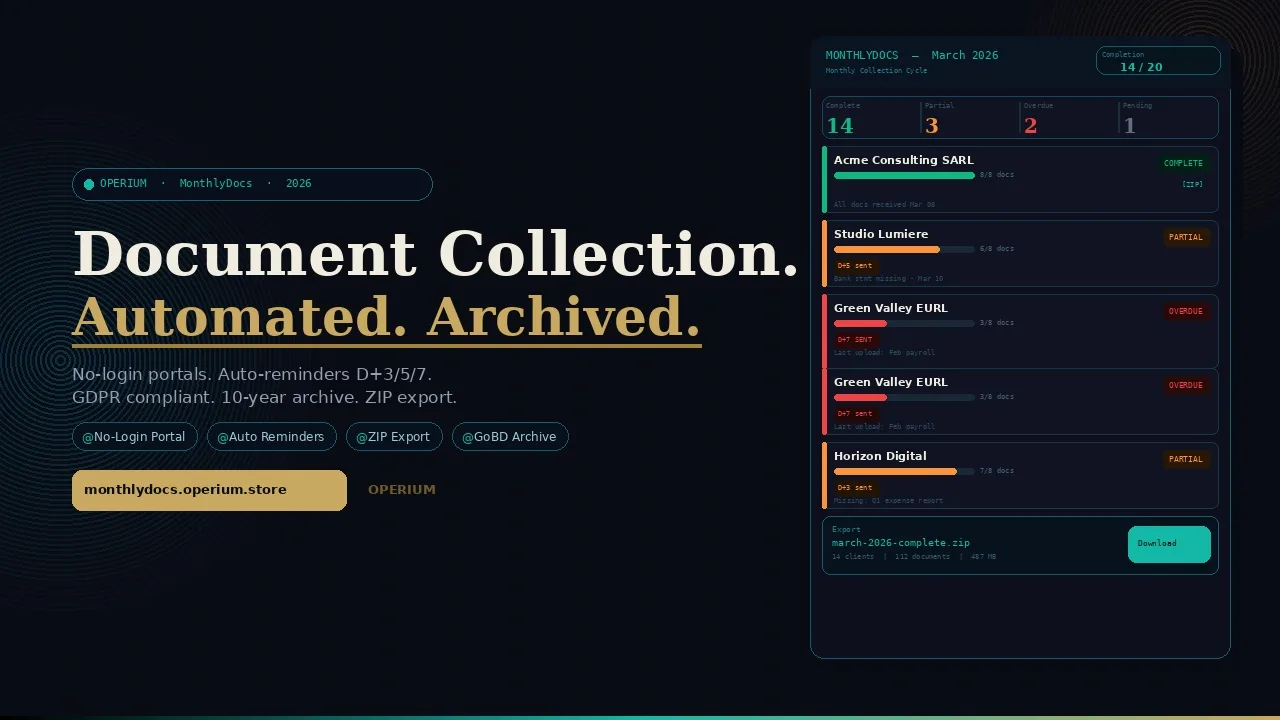
Every accountant and bookkeeper knows the last week of the month: the frantic chase for bank statements, invoices, expense receipts, and payroll exports from clients who have better things to do than organize financial documents. The average accounting practice spends 8-12 hours per month per client on document collection — not on the value-added work of analysis, advisory, and reporting, but on the administrative burden of sending reminder emails and following up on missing files. MonthlyDocs eliminates this overhead entirely: an automated document collection platform with no-login client portals, configurable checklists, automatic email reminders at Day 3, Day 5, and Day 7, a real-time completion dashboard, and structured ZIP export organized by month. This guide covers how to automate the monthly document collection cycle, the GDPR compliance requirements for no-login client portals, the 10-year document retention obligations under French and EU accounting law, and the security standards for handling sensitive financial data. Frequently asked questions on GDPR, archiving obligations, client portal security, and workflow automation are answered in full.
The Operational and Legal Cost of Manual Document Collection
The problem with manual document collection is not merely operational — it is legal. Accounting professionals who collect financial documents containing personal data (employee names, salaries, bank account details, tax identification numbers) via unprotected email attachments or generic cloud storage links are handling sensitive personal data without adequate security measures.
According to GDPR.eu's analysis of secure client portal compliance, transmitting personal financial data via email creates documented GDPR risks: no encryption in transit guarantee, no access control on the received attachment, no ability to revoke access if the email is forwarded, and no audit trail of who accessed which documents. Financial data — including salary information, bank details, and tax identification numbers — is particularly sensitive personal data requiring enhanced protection under GDPR Article 32.
The IRS guidance on document retention for tax professionals (Topic 305) establishes that accountants and bookkeepers must retain copies of client tax documents for a minimum of 3 years (federal), with extended retention requirements for specific document types. For EU-based accounting practices, French law requires 10-year retention of accounting documents under Article L123-22 of the Code de Commerce. Storing these documents in fragmented email threads and personal cloud folders makes compliance with retention obligations technically difficult to demonstrate in an audit.
The AICPA's data security standards for tax professionals establish that accounting firms collecting sensitive financial data are required to implement a written data security plan, appropriate technical safeguards for data in transit and at rest, and documented incident response procedures. Using unsecured email for document collection fails to meet these standards.
The Eight Manual Document Collection Failure Points
Failure Point 1 — Email chasing: The accountant sends a collection request by email. The client means to act but forgets. The accountant follows up manually on day 5. The client responds partially. The accountant follows up again. This cycle costs 45-90 minutes per client per month.
Failure Point 2 — Incomplete collections: Without a structured checklist, clients send what they think is needed — often missing critical documents that only become apparent during the actual bookkeeping work, requiring a second collection cycle.
Failure Point 3 — Insecure transmission: Email attachments containing payroll data, bank statements, and VAT invoices are transmitted without encryption, creating GDPR exposure for the accounting practice.
Failure Point 4 — No structured organization: Documents arrive in email threads, often in inconsistent naming conventions, requiring manual reorganization before use.
Failure Point 5 — No completion visibility: The accountant cannot see at a glance which clients have submitted all required documents and which are still pending — requiring individual status checks for each client.
Failure Point 6 — Version confusion: Clients sometimes send updated versions of documents that have already been submitted, creating version management problems in unstructured email collections.
Failure Point 7 — Retention compliance gaps: Documents stored only in email threads are not systematically archived, making 10-year retention compliance difficult to guarantee.
Failure Point 8 — Client friction from login requirements: Portals requiring clients to create and remember login credentials have high abandonment rates — the first-access friction is the most common reason clients delay document submission.
How MonthlyDocs Works: Complete Technical Architecture
MonthlyDocs resolves all eight failure points through an integrated four-module system.
Module 1: Client Onboarding and Checklist Templates
MonthlyDocs allows you to add clients via individual entry or CSV bulk import. For each client, you configure:
Client name and contact email (for reminder delivery)
Monthly checklist template (reusable across clients with the same document requirements)
Collection deadline (the day of the month by which documents are expected)
Language preference (for client-facing portal and reminders)
The reusable checklist template is the efficiency multiplier. Rather than recreating the document list for each client each month, you create templates once ("Standard SME Monthly", "Payroll Client Monthly", "VAT-Registered SME Monthly") and apply them to any number of clients. Templates contain:
Document name (e.g., "Bank statements — all accounts")
Document description (what format is acceptable, what period to cover)
Required/optional flag (clearly communicates to clients which documents are mandatory)
Instructions (any specific instructions for this document type)
Module 2: No-Login Secure Client Portal
Every month, MonthlyDocs generates a unique, secure portal URL for each client. This URL is the client's access point — no account creation, no password, no forgotten credentials. The portal displays:
The current month's checklist of required documents
Upload zones for each document category
Progress indicator showing which items have been submitted and which are pending
Submission confirmation with timestamp for each uploaded document
The security model is token-based: the unique URL contains a time-limited cryptographic token that authenticates the client's access without requiring a login. The token is client-specific (only the email address the portal was sent to can be used to upload documents), session-specific (a new token is generated each month), and access-logged (every upload event is timestamped and IP-logged for the audit trail).
As established by GDPR.eu's secure client portal analysis, no-login portals that use strong token-based authentication are GDPR-compliant for B2B document collection, provided that: the transmission is encrypted (HTTPS/TLS), access is controlled via the unique token, the portal link is not shared publicly, and the personal data is deleted or archived in compliance with retention obligations after use.
Module 3: Automatic Email Reminders
Once the monthly collection cycle opens, MonthlyDocs sends automatic email reminders to clients who have not completed their submission:
Day 3 reminder: "Friendly reminder — your documents for [Month] are due by [Deadline]. Here is your secure upload link."
Day 5 reminder: "Second reminder — [X] documents are still missing. Your upload portal is ready."
Day 7 reminder: "Final reminder — your documents for [Month] are now overdue. Please upload as soon as possible to avoid delays in your accounts."
Each reminder includes the client's unique portal link — one click takes them directly to their upload portal, pre-populated with their checklist showing exactly what is still missing.
The reminder cadence is configurable per client: some clients submit reliably after the first reminder; others require the full three-reminder cycle. Accountants can also configure reminder-free mode for clients who prefer to manage their own submission schedule.
Module 4: Dashboard and ZIP Export
The real-time dashboard provides a single-screen view of every client's submission status for the current month:
Green / Complete: All required documents submitted
Orange / Partial: Some documents submitted, some pending
Red / Overdue: Deadline passed with incomplete submission
Grey / Not started: No documents submitted yet
At the end of each collection cycle, MonthlyDocs exports a structured ZIP file containing all collected documents, organized by:
Client folder
Month folder
Document category subfolder
Individual files with standardized naming
This structured export is the direct input to the accountant's bookkeeping software — no manual reorganization required.
flowchart TD
    A[Accountant Creates Monthly Collection Cycle] --> B[Selects Clients and Applies Checklist Template]
    B --> C[MonthlyDocs Generates Unique Portal URL Per Client]
    C --> D[Portal Link Emailed to Each Client]
    D --> E{Client Uploads Documents?}
    E -->|Yes within deadline| F[Documents Stored and Dashboard Updated Green]
    E -->|No by Day 3| G[Automatic Day 3 Reminder Sent]
    G --> E
    E -->|No by Day 5| H[Automatic Day 5 Reminder Sent]
    H --> E
    E -->|No by Day 7| I[Automatic Day 7 Overdue Alert]
    F --> J[End of Cycle: Export Structured ZIP]
    I --> J
    J --> K[Accountant Imports ZIP into Bookkeeping Software]
    style A fill:#c9a962,color:#0c0e14
    style F fill:#10b981,color:#fff
    style J fill:#10b981,color:#fff
GDPR Compliance for No-Login Accounting Document Portals
The no-login portal architecture is one of the most common questions in accounting practice GDPR compliance. This section provides a definitive answer.
Lawful Basis for Processing Financial Documents
Under GDPR Article 6, the lawful basis for processing client financial documents in the accounting context is contract performance (Article 6(1)(b)) — the processing is necessary for the performance of the accounting services contract between the practice and the client. No additional consent is required for document collection that is explicitly within the scope of the engagement letter.
For documents containing sensitive personal data (employee salary information, personal bank account details, personal tax identification numbers), GDPR Article 9 may apply depending on the document type. In practice, accounting service contracts provide an explicit legal basis for processing this data in the context of legally mandated bookkeeping services.
Token-Based Authentication: GDPR Security Compliance
As confirmed by GDPR.eu's analysis of secure client portals, no-login portals using strong token-based authentication satisfy GDPR Article 32 security requirements when they implement:
HTTPS/TLS encryption for all data in transit (all MonthlyDocs portal connections are encrypted)
Token uniqueness: Each client receives a different token each month — a leaked token from one client cannot be used to access another client's portal
Token expiration: Tokens expire at the end of the monthly collection cycle — after the cycle closes, the portal link no longer works, preventing unauthorized access to historical documents
Access logging: Every document upload is logged with timestamp and IP address — creating the audit trail required for GDPR accountability documentation
Data Retention: The 10-Year Accounting Document Obligation
The conflict between GDPR's storage limitation principle and the 10-year accounting document retention obligation under French law is one of the most frequently misunderstood compliance points in accounting practice GDPR programs.
The resolution is clear: GDPR Article 6(1)(c) provides that processing is lawful when it is "necessary for compliance with a legal obligation to which the controller is subject." The 10-year retention obligation under Article L123-22 of the Code de Commerce constitutes exactly this legal obligation — it overrides the storage limitation principle and provides a valid lawful basis for retaining accounting documents for the full 10-year period.
MonthlyDocs archives all collected documents in encrypted storage for the configurable retention period (default: 10 years), satisfying both the legal obligation and the GDPR lawful basis documentation requirement simultaneously.
Subject Access Requests and Accounting Documents
When a client (or the employee whose salary data appears in the collected documents) exercises their GDPR right of access, MonthlyDocs provides an export function that generates a complete record of all documents collected from or about the requesting individual. This export is the accountant's evidence package for responding to subject access requests within the 30-day GDPR window.
Document Retention Obligations by Jurisdiction
France: 10-Year Obligation Under Code de Commerce
Article L123-22 of the Code de Commerce requires French businesses to retain accounting documents — including invoices, bank statements, payroll records, and tax documents — for a minimum of 10 years from the date of the underlying transaction. This obligation applies to both the business itself and to the accounting professional holding copies on the business's behalf.
MonthlyDocs implements 10-year encrypted archive retention by default for French-locale practices, with each document stored in an immutable archive that satisfies the GoBD and Code de Commerce authenticity requirements.
Germany: GoBD 10-Year Obligation
The GoBD (Grundsätze zur ordnungsmäßigen Führung und Aufbewahrung von Büchern) requires German businesses to retain accounting documents for 10 years (for accounting records and financial statements) and 6 years (for business correspondence). Documents must be stored in a format that is machine-readable, unaltered from the original, and accessible for 10 years from the date of retention.
MonthlyDocs's structured ZIP export preserves the original file format, filename, and upload metadata — satisfying the GoBD requirement for authentic, unaltered document retention.
Spain: 4-Year SII Obligation and 6-Year General Commercial Obligation
Spanish accounting document retention obligations span two legal frameworks: the SII (Suministro Inmediato de Información) requires VAT invoices and supporting documents to be retained for 4 years from the filing deadline; the general commercial code requires accounting books and documents to be retained for 6 years.
USA: IRS 3-7 Year Retention for Tax Professionals
Under IRS Topic 305, tax professionals must retain copies of client tax returns and supporting documents for a minimum of 3 years from the filing date (or 6 years if the return involves substantial underreporting of income, or indefinitely for returns involving fraud). The AICPA's data security standards require that this retention be in a secure, access-controlled format.
Integrating MonthlyDocs with the Complete OPERIUM Accounting Stack
MonthlyDocs is the document collection layer of the OPERIUM accounting ecosystem — the front-end process that feeds into the value-added analysis and reporting tools.
Connecting with Tax-Shield
Tax-Shield generates automated Stripe VAT reports. For clients who use Stripe as their primary payment processor, the monthly cycle is: MonthlyDocs collects the client's bank statements and expense invoices, Tax-Shield generates the Stripe VAT report for the same period, and the accountant reconciles the two data sources. MonthlyDocs and Tax-Shield together eliminate the two most time-consuming steps of the monthly bookkeeping cycle.
Connecting with ExportCompta
ExportCompta generates Stripe pre-accounting exports in FEC, Pennylane, CSV, and Excel formats. The monthly cycle integration is: MonthlyDocs collects the client's bank statements and invoices, ExportCompta generates the Stripe journal entries for the same period, and the accountant assembles the complete month's accounts from both data sources. The MonthlyDocs ZIP export and ExportCompta FEC export are the two inputs to the monthly journal.
Connecting with Partner-Portal
Partner-Portal delivers branded files to clients. After the monthly accounting work is complete, the accountant uploads the processed reports (balance sheet summary, VAT declaration confirmation, payroll summary) to the client's Partner-Portal workspace — closing the monthly loop with professional, tracked document delivery to complement the MonthlyDocs document collection.
Connecting with InvoiceBot
InvoiceBot handles professional invoicing. For accounting practices billing clients monthly, the completion of the MonthlyDocs collection cycle (all documents received) is the trigger for the InvoiceBot invoice generation — the billable event has occurred (documents collected and processed), and the invoice is generated automatically.
Connecting with KYC-Flow
KYC-Flow manages KYC document collection for regulated businesses. For accounting practices serving clients in regulated sectors (financial services, real estate, crypto), KYC-Flow handles the one-time identity verification document collection while MonthlyDocs handles the recurring monthly operational document collection — together covering the complete compliance document lifecycle.
Connecting with Contract-Sign
Contract-Sign documents engagement letters and service agreements. For new accounting clients, the cycle is: Contract-Sign for the engagement letter, MonthlyDocs for the first monthly collection cycle. The signed engagement letter (accessible in Contract-Sign's audit trail) defines the scope of documents to be collected — informing the MonthlyDocs checklist template configuration for that client.
The ROI of Automated Document Collection
Time Savings for Accounting Practices
Task | Manual Collection | MonthlyDocs |
|---|---|---|
Send monthly collection request | 5-10 min per client | 0 (automated) |
Day 5 follow-up reminder | 5-10 min per client | 0 (automated) |
Day 7 overdue follow-up | 10-15 min per client | 0 (automated) |
Organize received documents | 15-30 min per client | 0 (structured ZIP) |
Check collection status | 2-5 min per client | 0 (dashboard) |
Monthly hours saved (20 clients) | — | 20-35 hours |
Annual Revenue Impact for a 20-Client Practice
At $100/hour billing rate, 25 hours saved monthly generates $2,500 in recovered billable capacity — $30,000 per year. Against MonthlyDocs Pro ($29/month = $348/year), the ROI is 8,520% on the time savings alone. Even accounting for the fact that not all recovered time is billable, the ROI is substantial at any reasonable billability rate.
Pricing: Free, Starter, and Pro
Plan | Collections/Month | Price |
|---|---|---|
Free | 1 collection | $0 |
Starter | 10 collections | $15/month |
Pro | Unlimited collections | $29/month |
For a practice with 20 active clients, the Pro plan at $29/month provides all functionality with no per-client cost ceiling.
Comparative Analysis: MonthlyDocs vs. Alternative Document Collection Methods
Feature | MonthlyDocs | Email Collection | Dropbox/Drive Request | FirmPortal | Canopy |
|---|---|---|---|---|---|
No-login client portal | Yes | N/A | No | Limited | No |
Reusable checklist templates | Yes | No | No | Yes | Yes |
Auto email reminders (D+3/5/7) | Yes | Manual | No | Limited | Yes |
Real-time completion dashboard | Yes | No | No | Yes | Yes |
Structured ZIP export | Yes | No | No | Limited | Yes |
GDPR token-based security | Yes | No | Limited | Limited | Limited |
10-year archive retention | Yes | No | Limited | Limited | Limited |
CSV client import | Yes | No | No | Yes | Limited |
OPERIUM integration | Yes | No | No | No | No |
Price | $0-29/mo | $0 (labor cost) | $15-20/mo | $49-99/mo | $49+/mo |
Step-by-Step Setup Guide
Step 1: Create Your MonthlyDocs Account
Visit monthlydocs.operium.store and create your account. The free tier provides 1 monthly collection — enough to test the complete workflow with a single client before migrating your full practice.
Step 2: Create Your First Checklist Template
Build the document checklist that applies to your standard SME client. Typical monthly requirements: bank statements (all accounts), supplier invoices, expense receipts, payroll export, sales invoices (if not on SaaS billing), and any specific documents for this client type (stock inventory, project timesheets, etc.). Mark each item as required or optional. Add brief instructions for items that clients frequently misformat.
Step 3: Add Your Clients
Add clients individually or import via CSV (name, email, default checklist template). For each client, configure the monthly deadline (typically 5th or 10th of the following month) and the preferred reminder language.
Step 4: Open the First Collection Cycle
Click "Start Collection" for the target month. MonthlyDocs generates unique portal URLs for all clients and sends the initial collection request email with the portal link. The dashboard immediately shows all clients in "Pending" status.
Step 5: Monitor the Dashboard
Check the dashboard daily in the last week of the collection cycle. MonthlyDocs handles all reminders automatically — your dashboard shows you which clients are complete (no action needed) and which are overdue (decide whether to call them directly).
Step 6: Export and Process
When the collection cycle closes, click "Export ZIP" to download the structured archive of all collected documents. The ZIP is organized by client folder, then by document category, with each file named according to your template's naming convention. Import this ZIP into your bookkeeping software.
Step 7: Archive and Retain
MonthlyDocs automatically archives the collected documents in encrypted storage for the configured retention period. You never need to manually manage the archive — MonthlyDocs handles retention compliance automatically.
FAQ — Frequently Asked Questions
Is MonthlyDocs GDPR compliant for collecting sensitive financial documents without client login?
Yes. MonthlyDocs uses strong token-based authentication for no-login portal access — each client receives a unique, time-limited cryptographic token each month. As confirmed by GDPR.eu's secure portal analysis, token-based no-login portals satisfy GDPR Article 32 security requirements for B2B document collection when they implement HTTPS/TLS encryption, token uniqueness, token expiration, and access logging. MonthlyDocs implements all four requirements natively.
How long does MonthlyDocs retain collected accounting documents?
MonthlyDocs retains collected documents for a configurable period, defaulting to 10 years for EU-based practices — satisfying the French Code de Commerce Article L123-22 10-year retention obligation and the German GoBD 10-year requirement. This retention is the lawful basis for extended personal data retention under GDPR Article 6(1)(c) — legal obligation.
Can clients upload documents from their mobile device?
Yes. MonthlyDocs's no-login portal is fully responsive — clients can upload documents by taking photos on their smartphone (for paper receipts), attaching files from cloud storage (Google Drive, iCloud), or uploading from the device file system. The portal provides guidance on acceptable file formats and quality for each document type.
What file formats does MonthlyDocs accept?
MonthlyDocs accepts PDF, images (JPG, PNG, WebP), Microsoft Office files (Excel, Word), CSV files, and ZIP archives. Maximum file size is 50MB per document. For clients submitting bank statement exports, both PDF and CSV formats are supported.
How do the automatic reminders work, and can they be customized?
Automatic reminders are sent to clients who have not completed their submission by Day 3, Day 5, and Day 7 after the collection cycle opens. Each reminder includes the client's unique portal link and a dynamic document status (showing which items are submitted and which are still pending). Reminder text is customizable per template and per client — you can adjust the tone, add practice-specific instructions, or disable specific reminder days for individual clients.
Can I run collection cycles for multiple months simultaneously?
Yes. MonthlyDocs supports concurrent collection cycles for different months — for example, running a March collection cycle while also managing outstanding February submissions. Each cycle has an independent dashboard and export.
How is the structured ZIP export organized?
The ZIP export follows the structure: [ClientName]/[Month-Year]/[DocumentCategory]/[Filename]. Files are named according to the checklist template's naming convention, with the upload timestamp appended if multiple versions of the same document type are received. This structure maps directly to most bookkeeping software import conventions.
What happens to the portal link after the collection cycle closes?
The token-based portal link expires when the collection cycle closes. After expiration, the link no longer works — preventing clients from uploading documents to a closed cycle and preventing unauthorized access to previously submitted documents. If a client needs to submit a late document, you can reopen the cycle or create a one-off ad hoc collection request.
Does MonthlyDocs integrate with accounting software?
MonthlyDocs exports structured ZIPs that are importable into any bookkeeping or accounting software that accepts organized file uploads. For Stripe-based practices, the MonthlyDocs ZIP export integrates directly with ExportCompta for automated pre-accounting entries. Future integrations with Pennylane, QuickBooks, and Xero are on the MonthlyDocs roadmap.
Can I use MonthlyDocs for non-accounting document collection (legal, medical, HR)?
Yes. While MonthlyDocs is designed and optimized for accounting document collection, the checklist template system, no-login portal, and automated reminders work equally well for any recurring document collection need: legal document updates, medical record collection, HR compliance documentation, or any other professional service requiring monthly structured document submission from clients.
Conclusion: Every Hour Spent Chasing Documents Is an Hour Not Spent Adding Value
The fundamental proposition of MonthlyDocs is simple: accountants and bookkeepers were not trained to chase emails. They were trained to analyze financial data, identify risks, optimize tax positions, and provide strategic financial advice. Every hour spent on the administrative burden of document collection is an hour that could be spent on the work that clients actually value — and are willing to pay more for.
MonthlyDocs does not just save time — it changes the relationship between accountant and client. When document submission is effortless for the client (one link, clear checklist, no login, mobile-friendly) and completely hands-off for the accountant (automated reminders, real-time dashboard, structured export), the monthly cycle becomes smooth and predictable. Smoother monthly cycles mean lower practice operational costs, higher client satisfaction, and more bandwidth for the advisory work that differentiates premium accounting practices from commodity bookkeeping services.
Start with the Free plan — one collection, full feature access — and run the first month with your most consistently late-submitting client. Measure the time savings and the client experience improvement. That single data point will be sufficient to justify migrating your full practice to MonthlyDocs Pro.
The complete accounting automation stack from OPERIUM: MonthlyDocs for document collection, Tax-Shield for Stripe VAT reports, ExportCompta for pre-accounting exports, InvoiceBot for billing, and Partner-Portal for client report delivery.