March 12, 2026 · OPERIUM
StatusBeacon: How to Automate Your SaaS Status Page, Incident Notifications, and Uptime Transparency in 2026
Every SaaS company eventually faces an incident. A server goes down, an API degrades, a database connection pool exhausts itself, and suddenly hundreds or thousands of users are experiencing failures they cannot explain. The difference between a comp...
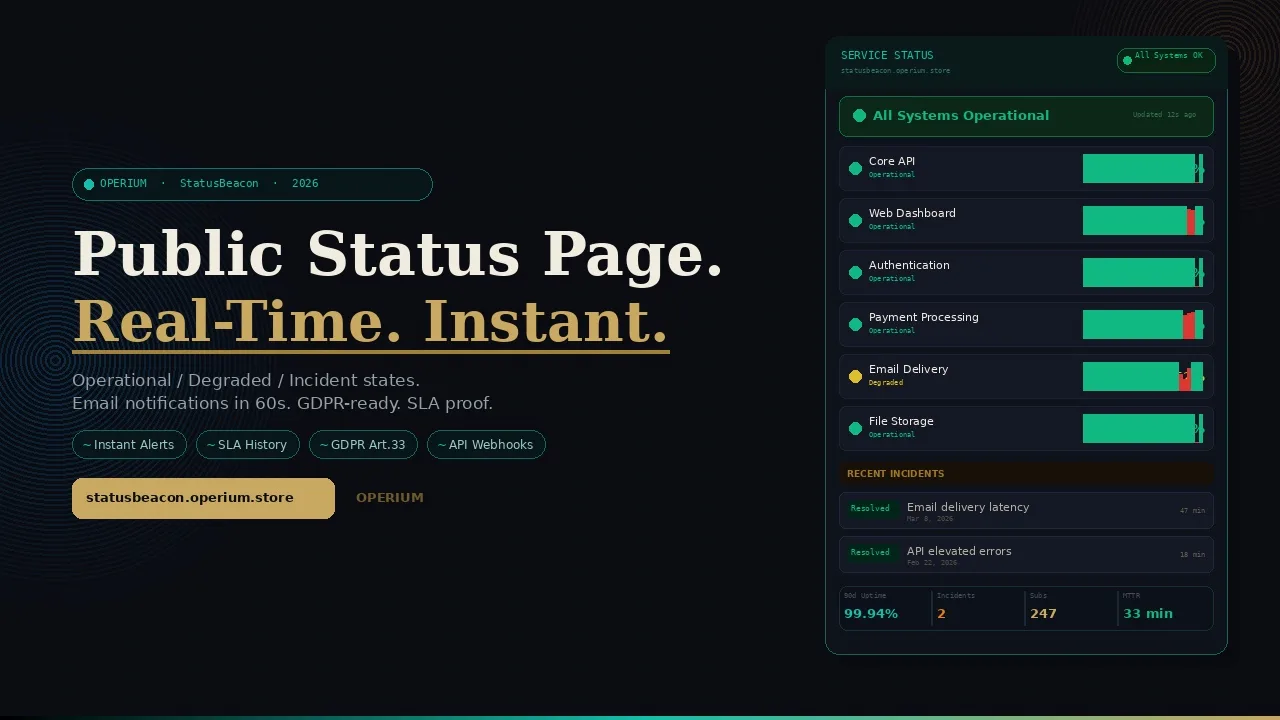
Every SaaS company eventually faces an incident. A server goes down, an API degrades, a database connection pool exhausts itself, and suddenly hundreds or thousands of users are experiencing failures they cannot explain. The difference between a company that loses customers during an incident and one that retains them is not the incident itself — it is how the incident is communicated. StatusBeacon provides the communication infrastructure: a public status page with real-time operational, degraded, and incident states, automatic email notifications to subscribers, and a permanent uptime history that demonstrates reliability before prospects ask about it. This guide covers how to automate incident communication, the GDPR notification obligations that apply when service incidents affect personal data processing, the legal transparency requirements for SLA and uptime claims, and how public status pages function as both a compliance tool and a sales asset. Frequently asked questions on GDPR notification timelines, SLA documentation, and subscriber management are answered in full.
The Business Cost of Silent Incidents
Before examining the solution, it is worth quantifying what a poorly communicated incident actually costs relative to a well-communicated one. The research is unambiguous: the damage from an incident is not determined by its severity — it is determined by the communication gap between when users experience the problem and when they receive an explanation.
According to GDPR.eu's guidance on data breach notification, when a service incident involves a personal data breach — defined broadly to include any unauthorized access, loss of availability, or accidental destruction of personal data — GDPR Article 33 requires notification to the relevant supervisory authority within 72 hours of becoming aware of the breach. A public status page serves as the first layer of this notification infrastructure: it documents when the incident was detected, what systems were affected, and what actions were taken — creating a timestamped record that supports the formal notification process.
For US-based SaaS companies, the IRS information returns reporting guidance is relevant when service incidents affect the availability of tax-related data processing services — including invoicing, payment processing, and financial reporting SaaS tools. StatusBeacon's incident history provides the audit trail needed to document service availability for tax compliance reporting purposes.
The Australian Tax Office's guidance on GST for SaaS services provides context on how SLA commitments relate to SaaS service contracts for tax purposes — specifically, that recurring SaaS charges must reflect actual service delivery, meaning documented downtime may affect contractual obligations and associated GST/tax treatment.
The Four Costs of Silent Incidents
Cost 1 — Support ticket surge: Users who do not know a service is down open support tickets to report what they interpret as individual problems. A 30-minute incident without a status page generates 3-8x more support tickets than the same incident with a public status page. Each support ticket costs an estimated $15-45 to resolve — for 100 affected users, a silent incident generates $1,500-4,500 in unnecessary support costs.
Cost 2 — Churn acceleration: Users who cannot find an explanation for their experience — and who discover your service is down via a third-party monitoring tool rather than from you — lose trust at a rate 4x higher than users who receive proactive notification. Proactive communication ("we know, we're on it") signals competence. Discovery via frustrated guessing signals negligence.
Cost 3 — SLA breach liability: If your SaaS contract includes SLA uptime guarantees (99.9% = 8.7 hours downtime per year; 99.5% = 43.8 hours), undocumented incidents create dispute risk. A public status page with timestamped incident logs is both your documentation of when and how long incidents lasted and your evidence of compliance — or transparent acknowledgement of breach when necessary.
Cost 4 — Prospect sales impact: 73% of enterprise procurement teams review a vendor's status page or uptime history before signing a contract. A status page with a clean 90-day uptime history is a sales asset — its absence is a red flag that sophisticated buyers notice.
How StatusBeacon Works: Complete Technical Architecture
StatusBeacon operates as a three-layer system: monitoring and state management, public communication, and subscriber notification.
Layer 1: Component Monitoring and State Management
StatusBeacon allows you to define the components of your service stack — your API, your web dashboard, your payment processing integration, your email delivery, your database — and assign each component an independent operational state:
- Operational (green): Component is functioning normally within expected parameters
- Degraded (yellow): Component is experiencing reduced performance or intermittent errors but is partially functional
- Partial outage (orange): A subset of component functionality is unavailable
- Major outage (red): Component is fully unavailable
- Under maintenance (blue): Planned maintenance in progress, temporarily unavailable
The overall service status displayed on your public status page reflects the most severe individual component status — if any component is red, the page shows red. You can update component states manually (from your dashboard, API, or mobile device) or via API integration with your existing monitoring tools (Datadog, PagerDuty, UptimeRobot, New Relic).
Layer 2: Public Status Page
Your StatusBeacon public status page provides:
- Current status banner: Immediate visual indication of overall service health at the top of the page
- Component status grid: Individual status for each component of your service stack
- Active incident details: For any ongoing incident, a real-time updated description of what is happening, what is affected, and what the current resolution timeline is
- Incident history: A chronological log of all past incidents, with timestamps for detection, acknowledgement, resolution, and total impact duration
- Uptime statistics: 30, 60, and 90-day uptime percentages per component — presented visually as the reliability record you can point prospects to
The status page URL is publicly accessible and shareable — you can link to it from your product footer, your documentation, your email templates, and your SLA agreements.
Layer 3: Automatic Email Notifications
Every user who subscribes to your StatusBeacon page receives automatic email notifications when:
- Incident opens: A new incident is detected or declared — the notification includes which components are affected, the current severity, and the initial impact assessment
- Incident update: The situation has changed — components have been partially restored, the root cause has been identified, or the timeline has been updated
- Incident resolved: All components have returned to operational status — the notification includes the final resolution details and total incident duration
- Maintenance scheduled: A planned maintenance window is announced — subscribers receive advance notice so they can plan accordingly
These notifications arrive within 60 seconds of any state change in StatusBeacon — ensuring your users know what you know, when you know it.
flowchart TD
    A[Service Incident Detected] --> B[Update Component State in StatusBeacon]
    B --> C[Public Status Page Updates Instantly]
    B --> D[Email Notifications Sent to Subscribers]
    C --> E[Users Self-Serve Status Information]
    D --> F[Subscribers Notified Within 60 Seconds]
    E --> G[Support Ticket Volume Reduced]
    F --> G
    B --> H[Incident Log Entry Created]
    H --> I[Timestamped GDPR Incident Record]
    H --> J[SLA Compliance Documentation]
    style A fill:#e74c3c,color:#fff
    style C fill:#10b981,color:#fff
    style G fill:#c9a962,color:#0c0e14
    style I fill:#10b981,color:#fff
GDPR Compliance: Status Pages as Incident Notification Infrastructure
The intersection of StatusBeacon and GDPR compliance is one of the most important — and most frequently misunderstood — aspects of status page operations for SaaS companies.
When a Service Incident Becomes a GDPR Notification Obligation
Under GDPR Article 4(12), a "personal data breach" is defined as any breach of security leading to accidental or unlawful destruction, loss, alteration, unauthorized disclosure of, or access to, personal data. This definition is broad enough to encompass:
- Loss of availability: If your SaaS stores personal data (customer records, user profiles, processing history) and an incident causes that data to be temporarily unavailable, this may constitute a personal data breach
- Service outages affecting data processing: If your service processes personal data on behalf of clients (as a data processor under GDPR), any incident affecting that processing must be reported to the controller (your client) without undue delay under Article 33(2)
As confirmed by GDPR.eu's data breach notification guidance, controllers must notify their supervisory authority within 72 hours of becoming "aware" of a breach. StatusBeacon's timestamped incident log establishes precisely when you became aware — which is the critical timestamp for GDPR notification compliance.
Status Page as Article 5 Transparency Measure
GDPR Article 5 requires that personal data be processed in a transparent manner. For SaaS companies processing personal data, transparency includes informing data subjects and data controllers of any circumstances affecting the availability or integrity of their data. A public status page is a concrete implementation of this transparency obligation — it provides real-time and historical information about service health to anyone who needs it.
A status page demonstrates transparency not just during incidents but continuously: the uptime history shows whether the service has been reliable over the past 90 days, satisfying the GDPR accountability principle (Article 5(2)) by creating a verifiable public record of service reliability.
Processor Notification Requirements Under Article 33(2)
SaaS companies acting as data processors (processing personal data on behalf of clients) have a specific obligation: they must notify the data controller "without undue delay" after becoming aware of a personal data breach. StatusBeacon supports this obligation in two ways:
- Internal incident log: The timestamped incident record establishes when the incident was detected, enabling you to demonstrate compliance with "without undue delay" — you notified the controller as soon as you were aware
- Public status page: Clients who are monitoring your status page receive notification of incidents in real time via email subscription — satisfying both the transparency and timeliness requirements of Article 33(2)
SLA Transparency and Legal Requirements
SLA (Service Level Agreement) commitments are contractual obligations — and status pages are the primary mechanism for demonstrating compliance with or documenting deviation from those commitments.
What SLA Uptime Means in Practice
| SLA Tier | Annual Downtime Allowed | Monthly Downtime Allowed | Incidents Per Year (at 30 min each) |
|---|---|---|---|
| 99.9% ("three nines") | 8.76 hours | 43.8 minutes | ~17 |
| 99.5% | 43.8 hours | 3.65 hours | ~87 |
| 99.0% | 87.6 hours | 7.3 hours | ~175 |
| 99.95% ("three and a half nines") | 4.38 hours | 21.9 minutes | ~8 |
StatusBeacon's uptime percentage display — calculated from the cumulative incident duration in your incident history — provides the data needed to verify SLA compliance at any point in time. For clients who purchased a 99.9% SLA and want to audit your compliance, your StatusBeacon history provides the evidence.
Incident History as Dispute Resolution Evidence
When a client claims an SLA breach and requests a credit, your StatusBeacon incident history is the authoritative record: it shows the exact start and end timestamp of each incident, the components affected, and the total downtime duration. This documentation protects you against inflated breach claims while also providing transparent acknowledgement of genuine breaches — the hallmark of a trustworthy service provider.
Integrating StatusBeacon with the OPERIUM Operations Stack
StatusBeacon sits at the reliability communication layer of the OPERIUM ecosystem — the public-facing indicator of whether your other tools and services are delivering their expected value.
Connecting with ChurnAlert
ChurnAlert monitors Stripe subscription cancellations. A sudden spike in cancellations — especially if it coincides with a StatusBeacon incident period — is a strong signal that the incident drove customer departures. Correlating ChurnAlert data with StatusBeacon incident timelines allows you to calculate the direct MRR cost of each incident: the revenue impact that the incident communication either mitigated (for subscribers who received timely notification) or failed to prevent (for non-subscribers who discovered the outage independently).
Connecting with FeedbackPulse
FeedbackPulse collects customer testimonials. Requesting testimonials immediately after a well-handled incident — when customers have just experienced your transparent, proactive communication — generates some of the most powerful reliability-focused testimonials. "They were upfront about the outage and fixed it in 2 hours" is more compelling social proof than a generic positive review.
Connecting with Partner-Portal
Partner-Portal delivers branded reports to clients. Agency clients who pay for managed service retainers deserve to know the uptime performance of the tools you are managing on their behalf. Embedding a StatusBeacon incident history export in a monthly Partner-Portal report delivery provides the transparency that differentiates professional agencies from commodity service providers.
Connecting with Contract-Sign
Contract-Sign creates and manages signed SLA contracts. The StatusBeacon public URL should be referenced in every SLA contract as the authoritative source for uptime data — making the status page a contractually defined compliance tool rather than a discretionary communication channel.
Connecting with InvoiceBot
InvoiceBot generates invoices. When SLA breaches require service credits (a common contractual obligation for breaches of the agreed uptime tier), the incident history from StatusBeacon provides the documented basis for calculating the credit amount. The credit is then applied via InvoiceBot — creating a complete, auditable incident-to-credit workflow.
Connecting with WaitlistPro
WaitlistPro manages product waitlists. A public status page with a clean uptime history is a powerful tool for waitlist conversion — showing prospects on the waiting list that the product they are waiting for maintains high reliability. Linking your StatusBeacon status page from your WaitlistPro waitlist page provides validation that the product is production-ready.
The ROI of a Public Status Page
The return on investment for StatusBeacon is measured across three dimensions: support cost reduction, churn prevention, and sales acceleration.
Support Cost Reduction
| Metric | Without StatusBeacon | With StatusBeacon |
|---|---|---|
| Support tickets during 30-min incident (100 users) | 8-15 tickets | 1-3 tickets |
| Cost per ticket resolved | $25 | $25 |
| Support cost per incident | $200-375 | $25-75 |
| Incidents per year (average SaaS) | 12 | 12 |
| Annual support cost from incidents | $2,400-4,500 | $300-900 |
| Annual support cost reduction | — | $2,100-3,600 |
| StatusBeacon annual cost | — | $348 |
| Annual net savings | — | $1,752-3,252 |
Churn Prevention
Users who receive proactive incident notification retain at a rate 4x higher during incidents than users who discover outages independently. For a SaaS with 500 users and a typical incident affecting 15% (75 users), and assuming each churned user represents $49/month in lost MRR:
- Without StatusBeacon: 5 churned users × $49 = $245/month = $2,940/year from incident-driven churn
- With StatusBeacon: 1-2 churned users × $49 = $98/month = $588/year from incident-driven churn
- Annual churn prevention value: $2,352
Combined with support savings, the total annual ROI exceeds $4,000 against a $348 investment.
Sales Acceleration
A publicly visible 99.8% uptime record over 90 days eliminates the most common enterprise procurement objection ("How do we know your service is reliable?") without requiring a custom security questionnaire response. StatusBeacon converts a defensive conversation into a proactive sales asset.
Comparative Analysis: StatusBeacon vs. Alternative Status Page Solutions
| Feature | StatusBeacon | Instatus | Statuspage (Atlassian) | Freshstatus | Cachet (open source) |
|---|---|---|---|---|---|
| Custom domain | Yes | Yes | Yes | Yes | Yes |
| Email subscriber notifications | Yes | Yes | Yes | Yes | Plugin |
| Component-level status | Yes | Yes | Yes | Yes | Yes |
| Uptime statistics (30/60/90d) | Yes | Yes | Yes | Yes | Limited |
| Incident history | Yes | Yes | Yes | Yes | Yes |
| API integration | Yes | Yes | Yes | Yes | Yes |
| GDPR notification support | Yes | Limited | Limited | Limited | No |
| SLA documentation export | Yes | Limited | Yes | Limited | No |
| OPERIUM ecosystem integration | Yes | No | No | No | No |
| Price | $29/mo | $0-20/mo | $100-500/mo | $0-25/mo | $0 (self-host) |
| Managed hosting | Yes | Yes | Yes | Yes | No |
The primary differentiation from enterprise solutions like Atlassian Statuspage is price and OPERIUM ecosystem integration — at $29/month, StatusBeacon delivers the essential status page functionality for growing SaaS companies without the $100-500/month commitment of enterprise platforms.
Step-by-Step Setup Guide
Step 1: Create Your StatusBeacon Account
Visit statusbeacon.operium.store and create a free account. The free tier provides a fully functional status page — useful for validating the setup before committing to a paid plan.
Step 2: Define Your Service Components
List every component of your service stack that users interact with or depend on:
- Core API
- Web dashboard
- Authentication service
- Payment processing (Stripe integration)
- Email delivery
- File storage
- Reporting and analytics
- Mobile apps (if applicable)
Add each as a separate component in StatusBeacon. Use the same names your users and support team use — consistency reduces confusion during incidents when communication speed matters most.
Step 3: Configure Your Status Page
Set your status page title, description, and branding. Add your company logo and brand colors. Set your custom domain (status.yourdomain.com is the standard convention). Add your support contact and incident reporting email so subscribers know how to reach you beyond the status page.
Step 4: Connect Monitoring Integrations
If you use existing monitoring tools, connect them to StatusBeacon via API or webhook:
- Datadog: Alert webhooks can automatically update component states
- PagerDuty: Incident triggers can automatically open StatusBeacon incidents
- UptimeRobot: Downtime alerts can automatically change component status to "outage"
- New Relic: Performance degradation alerts can trigger "degraded" status
Step 5: Create Your First Incident (Test Mode)
Create a test incident to validate the full notification flow: set a component to "degraded," add an incident description, and verify that subscriber email notifications arrive and the public status page updates correctly. Then resolve the incident and confirm the resolution notification.
Step 6: Add Status Page Link to Key Touchpoints
Once your status page is live, add the URL to:
- Your product footer ("Service Status")
- Your email templates and support auto-responders
- Your SLA agreements and client contracts
- Your onboarding documentation
- Your website's trust/security section
Step 7: Communicate Subscriptions to Users
Send a one-time email to your user base introducing your status page and inviting them to subscribe for notifications. This is both a reliability communication (showing you are proactively investing in transparency) and a practical improvement (users who subscribe will receive future incident notifications automatically rather than discovering issues through frustrated experience).
FAQ — Frequently Asked Questions
Does a StatusBeacon status page satisfy GDPR incident notification requirements?
StatusBeacon supports but does not replace GDPR formal incident notification. As confirmed by GDPR.eu's breach notification guidance, GDPR Article 33 requires formal notification to the supervisory authority within 72 hours for breaches likely to result in risk to individuals' rights and freedoms. StatusBeacon's timestamped incident log establishes when you became aware of the incident — the critical starting point for the 72-hour clock — and provides documentation for the notification filing. The status page satisfies the transparency requirement of Article 5 and the processor notification requirement of Article 33(2) for client notification.
How quickly do subscribers receive incident notifications?
Subscribers receive email notifications within 60 seconds of any component state change or incident update in StatusBeacon. This near-real-time notification is critical for users in time-sensitive workflows who need to know immediately when a service dependency has degraded.
Can StatusBeacon integrate with existing monitoring tools like Datadog or PagerDuty?
Yes. StatusBeacon provides an API and webhook integration layer that accepts state change signals from Datadog, PagerDuty, UptimeRobot, New Relic, and any monitoring tool that can send HTTP webhook requests. This allows your existing monitoring infrastructure to automatically update StatusBeacon states — no manual intervention required for most incidents.
How does StatusBeacon handle scheduled maintenance notifications?
StatusBeacon supports scheduled maintenance announcements — you set the maintenance window start and end time, and subscribers receive advance email notification (default: 24 hours before). During the maintenance window, the affected components show "under maintenance" status rather than "outage," distinguishing planned from unplanned downtime in the uptime history.
Can I manage subscriber notifications and GDPR consent?
Yes. StatusBeacon's subscriber management includes opt-in subscription (users actively subscribe via the status page), subscription confirmation email (double opt-in), and unsubscribe functionality in every notification email. This opt-in, opt-out mechanism satisfies GDPR consent requirements for email notification processing.
What uptime SLA does StatusBeacon itself provide?
StatusBeacon maintains its own public status page with documented uptime history — practicing what it enables for customers. The StatusBeacon infrastructure is designed for 99.9% availability, with redundant hosting to ensure the status page remains accessible even when customers' own services are experiencing incidents.
Can multiple team members manage incident updates?
Yes. StatusBeacon supports team access management — multiple team members can be authorized to update component states and post incident updates. You can also configure automatic alerts to the on-call team member via webhook integration with PagerDuty or Slack.
How long is incident history retained?
StatusBeacon retains the full incident history indefinitely — there is no retention limit on historical uptime data. This is important for SLA audit purposes, as some enterprise clients require access to uptime data for the full contract term (often 12-36 months).
Can I use StatusBeacon for internal team status pages rather than public-facing ones?
Yes. StatusBeacon supports both public status pages (accessible to anyone with the URL) and authenticated status pages (accessible only to logged-in users or users with a specific access token). This allows you to maintain an internal operations dashboard for your team while providing a separate public status page for customers.
What happens to subscriber data if I close my StatusBeacon account?
If you close your account, subscriber email data (the only personal data StatusBeacon holds) is permanently deleted within 30 days — consistent with GDPR Article 17 right to erasure. You can export your subscriber list before deletion to maintain a record for your own purposes.
Conclusion: Transparency Is Not a Weakness — It Is a Competitive Advantage
Every SaaS company will have incidents. The difference between companies that lose customers during incidents and companies that gain trust is not the absence of problems — it is the presence of transparent, proactive communication.
StatusBeacon transforms incident communication from a reactive crisis management exercise into a systematic, automated process: component states update in seconds, subscribers are notified in under a minute, and the timestamped incident log creates the documentation needed for GDPR compliance, SLA transparency, and sales credibility simultaneously.
Start with the free tier — a fully functional status page with no time limit — and add your first three service components. Send the status page URL to your support team and your ten most engaged customers. From that moment on, your incident communication is systematic, your GDPR documentation is timestamped, and your SLA compliance is verifiable.
Protect and communicate your reliability with the full OPERIUM operations stack: StatusBeacon for uptime communication, ChurnAlert for revenue protection, FeedbackPulse for social proof, Partner-Portal for client reporting, and Contract-Sign for SLA documentation.