March 12, 2026 · OPERIUM
ExportCompta: How to Automate Stripe Accounting Exports — FEC, Pennylane, Multi-Currency, and 1099-K Compliance for Freelancers and Micro-Enterprises in 2026
Every freelancer and micro-enterprise using Stripe as their primary payment processor faces the same monthly problem: Stripe collects the revenue, but it does not produce the accounting entries. Between gross revenue, Stripe fees, VAT collected, curr...
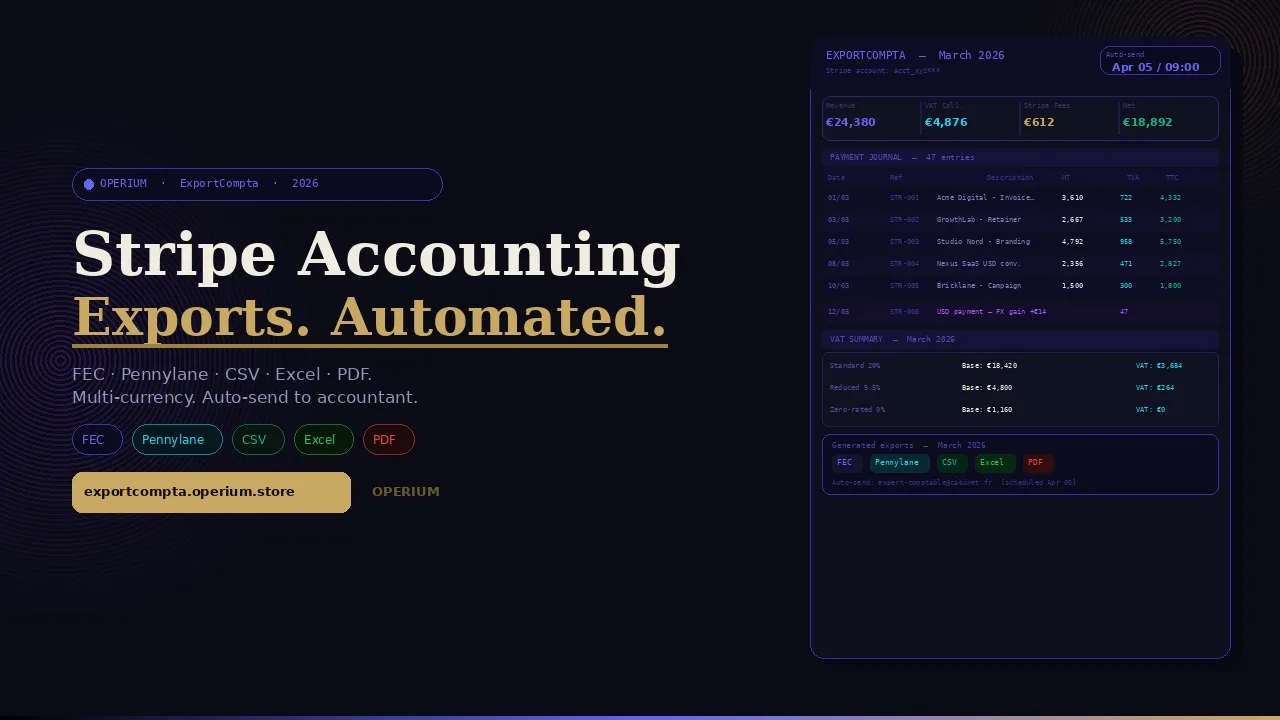
Every freelancer and micro-enterprise using Stripe as their primary payment processor faces the same monthly problem: Stripe collects the revenue, but it does not produce the accounting entries. Between gross revenue, Stripe fees, VAT collected, currency conversions, refunds, and disputes, the monthly reconciliation between Stripe's dashboard and your accounting system can take 3-5 hours — hours that cost more in professional fees or opportunity cost than the entire annual subscription to a dedicated Stripe accounting export tool. ExportCompta eliminates every step of this reconciliation: a fully automated Stripe pre-accounting platform that generates the complete monthly pack (payment journal, VAT summary, Stripe fees report) in FEC, Pennylane, CSV, Excel, and PDF formats, with multi-currency support and automatic delivery to your accountant. This guide covers how to automate Stripe accounting exports, the 1099-K obligations for Stripe users, SOC2 compliance standards for accounting data handling, IRS accounting period fundamentals, and the GDPR implications of processing financial data via third-party export tools. Frequently asked questions on FEC format requirements, multi-currency accounting, Stripe fees deductibility, and export automation are answered in full.
The True Cost of Manual Stripe Accounting Reconciliation
The cost of manual Stripe accounting reconciliation is rarely calculated precisely — but it is consistently significant. Consider the monthly reconciliation workflow for a freelancer with 40 Stripe transactions in a given month:
According to Stripe's analysis of accounting period fundamentals and IRS 1099-K obligations, the 1099-K reporting threshold for payment processors was significantly reduced to $600 in recent IRS guidance (though implementation has been phased), meaning many more freelancers now receive 1099-K forms from Stripe and are subject to the reconciliation obligation of matching 1099-K gross payment figures against their reported gross income. A manual reconciliation error between Stripe's 1099-K figures and a tax return can trigger an IRS inquiry — making accurate Stripe accounting export not just an efficiency issue but a compliance obligation.
The Stripe 2026 Tax Trends Report identifies automated accounting exports as the top compliance priority for SaaS founders and freelancers managing multi-jurisdiction tax obligations in 2026, with manual spreadsheet reconciliation cited as the primary source of VAT under-reporting errors in platform-based businesses.
For professional accounting compliance, Stripe's SaaS compliance requirements guide establishes that SOC2 Type II-compliant accounting data handling requires: encrypted data transmission between Stripe and export tools, audit trails for all data access and export events, and a documented data processing agreement between the SaaS provider and the Stripe account holder. ExportCompta operates under a documented data processing agreement and implements all SOC2-relevant security requirements for Stripe data handling.
The Six Manual Stripe Reconciliation Steps — and How ExportCompta Eliminates Them
Step 1 — Download Stripe CSV: Log in to Stripe Dashboard, navigate to Reports, select the correct date range, download the payments CSV. Time: 5-10 minutes. ExportCompta connects via restricted API key and extracts data automatically.
Step 2 — Filter and clean data: Remove test transactions, apply payment status filters (successful only), identify refunds and disputes, separate Stripe fees from net amounts. Time: 15-30 minutes. ExportCompta applies all filters automatically.
Step 3 — Calculate VAT: Identify the applicable VAT rate for each transaction (standard rate, reduced rate, zero-rate for international), extract the VAT component from each gross amount, sum by VAT rate for the declaration. Time: 30-60 minutes for mixed-rate businesses. ExportCompta calculates VAT per transaction based on configured tax rules.
Step 4 — Handle currency conversions: For businesses accepting payments in multiple currencies, convert each foreign currency transaction to the functional currency at the applicable exchange rate (ECB rate for EU, IRS rate for US), document each conversion, calculate the FX gain or loss. Time: 20-45 minutes for multi-currency businesses. ExportCompta handles multi-currency conversion automatically using the applicable central bank rates.
Step 5 — Generate accounting entries: Create the journal entries for each transaction category (revenue, VAT payable, Stripe fees, bank deposits), in the format required by your accounting software. Time: 30-60 minutes. ExportCompta generates FEC, Pennylane, CSV, and Excel files ready for direct import.
Step 6 — Send to accountant: Compile all outputs into a structured package and email to your accountant. Time: 10-15 minutes. ExportCompta auto-sends the monthly pack directly to your accountant's email address on the configured delivery date.
Total manual time: 1.5-4 hours per month. ExportCompta time: 0 minutes after initial setup.
How ExportCompta Works: Complete Technical Architecture
ExportCompta operates through four core modules: Stripe connection, report generation, format export, and auto-delivery.
Module 1: Stripe Connection via Restricted API Key
ExportCompta connects to your Stripe account using a restricted API key with read-only permissions — the same security model used by Tax-Shield and all OPERIUM financial integrations. The restricted key provides access to transaction data without the ability to initiate payments, modify account settings, or access customer personal data beyond what is necessary for the accounting export.
The restricted API key model is the SOC2-recommended approach for third-party accounting integrations: your real API key never leaves Stripe, and ExportCompta's access is limited to the specific data scopes required for report generation (charges, refunds, transfers, balance transactions, and fee details).
Module 2: Report Generation
ExportCompta generates three core reports from each month's Stripe data:
Report 1 — Payment Journal: A complete, transaction-level record of all Stripe payments in the period. Each entry includes: transaction date, Stripe payment ID, customer description, gross amount, Stripe fee, net amount, applicable VAT rate, VAT amount, net-of-VAT amount, currency, and exchange rate (for foreign currency transactions). This is the primary accounting record used by your accountant to post journal entries.
Report 2 — VAT Summary: An aggregated summary of VAT by rate category for the period. Total gross sales, VAT base (net of VAT), VAT amount at each applicable rate, and total VAT payable. This summary maps directly to the VAT declaration fields required in France, Germany, Spain, and other EU jurisdictions.
Report 3 — Stripe Fees Report: A complete breakdown of Stripe processing fees, including standard transaction fees (percentage + fixed), dispute fees, international card fees, currency conversion fees, and any other Stripe charges. This report is the source document for the "bank charges and fees" deduction line in your profit and loss account.
Module 3: Multi-Format Export
ExportCompta generates all reports in five formats simultaneously:
FEC (Fichier des Écritures Comptables): The mandatory French accounting export format required for tax audits since 2014. ExportCompta's FEC output satisfies all field requirements: JournalCode, JournalLib, EcritureNum, EcritureDate, CompteNum, CompteLib, CompAuxNum, CompAuxLib, PieceRef, PieceDate, EcritureLib, Debit, Credit, EcritureLet, DateLet, ValidDate, MontantDevise, Idevise.
Pennylane: The native import format for Pennylane, France's leading cloud accounting platform for SMEs. ExportCompta's Pennylane export enables zero-configuration import into Pennylane — no field mapping, no manual adjustment required.
CSV: Universal comma-separated format compatible with any accounting software. Column headers configurable to match your accounting software's import template.
Excel: Pre-formatted Excel workbook with three tabs (Payment Journal, VAT Summary, Fees Report), with totals, subtotals, and conditional formatting for easy review.
PDF: Print-ready PDF version of all three reports, suitable for archiving, sharing with advisors, and satisfying document retention obligations.
Module 4: Auto-Send to Accountant
Once the monthly pack is generated, ExportCompta sends it automatically to the accountant's email address configured in your settings. The auto-send includes:
- All five format variants of all three reports
- A cover note summarizing key figures (total revenue, total VAT, total fees, net to bank account)
- A link to the ExportCompta dashboard for the accountant to review online
Auto-send is configurable: you can set the delivery date (e.g., the 5th of each month for the previous month's data), trigger it manually, or send immediately after the month closes.
flowchart TD
    A[ExportCompta Connects to Stripe via Restricted API Key] --> B[Extracts All Transactions for Configured Period]
    B --> C[Filters and Validates Data]
    C --> D[Calculates VAT per Transaction and Rate]
    D --> E[Applies Multi-Currency Conversion at Central Bank Rates]
    E --> F[Generates Payment Journal and VAT Summary and Fees Report]
    F --> G{Export Format Selection}
    G -->|France| H[FEC File Generated]
    G -->|Pennylane Users| I[Pennylane Import File]
    G -->|Universal| J[CSV and Excel and PDF]
    H --> K[Auto-Send Pack to Accountant]
    I --> K
    J --> K
    K --> L[Monthly Accounting Cycle Complete - Zero Manual Work]
    style A fill:#c9a962,color:#0c0e14
    style L fill:#10b981,color:#fff
    style K fill:#10b981,color:#fff
IRS Compliance: 1099-K Obligations and Stripe Accounting
The IRS 1099-K reporting requirements create a specific accounting obligation for US-based Stripe users that makes accurate transaction-level accounting records essential.
As detailed in Stripe's accounting period fundamentals guide, the 1099-K form reports gross payments received through a payment processor — including the gross amount before Stripe fees are deducted. This creates a reconciliation requirement: your tax return must be reconcilable to the 1099-K gross figure, with Stripe fees deducted as a business expense (not netted against gross revenue). Failing this reconciliation triggers automatic IRS matching discrepancies.
ExportCompta's Payment Journal reports gross revenue and Stripe fees as separate line items — exactly the format required for accurate 1099-K reconciliation. The Stripe Fees Report provides the documentation for the "payment processing fees" deduction line, satisfying the IRS substantiation requirement for this expense category.
Cash vs. Accrual Accounting and Stripe Exports
For cash-basis accounting (the method used by most US freelancers and many EU micro-enterprises), revenue is recognized when payment is received — the Stripe settlement date. For accrual accounting (required for EU companies above the micro-enterprise threshold), revenue is recognized at the invoice date — which may differ from the Stripe payment date for invoices paid late.
ExportCompta supports both accounting methods: you configure your recognition basis in settings, and the Payment Journal timestamps transactions accordingly. For accrual-basis users, ExportCompta maps each Stripe payment to its associated invoice (via the Stripe payment description or metadata) and posts the revenue entry at the invoice date with a separate entry for the cash receipt at the settlement date.
SOC2 Compliance: Accounting Data Security Standards
For freelancers and agencies managing client financial data through Stripe, the Stripe SaaS compliance requirements guide establishes that third-party tools accessing Stripe data for accounting purposes should meet SOC2 Type II standards for data security.
ExportCompta implements the following SOC2-relevant controls:
- Encryption in transit: All API calls to Stripe use TLS 1.3; all data transmitted to your accountant is encrypted
- Encryption at rest: Cached transaction data is stored with AES-256 encryption
- Access controls: Restricted API key with minimum necessary permissions; no broad account access
- Audit logs: Every data access and export event is logged with timestamp, export format, and delivery recipient
- Data minimization: ExportCompta accesses only the Stripe data scopes required for report generation — no customer personal data beyond transaction metadata
- Data retention: Cached Stripe data is purged after export delivery; the only retained data is the generated report files (retained for the configurable archive period)
GDPR and Financial Data Processing
ExportCompta processes financial data that may contain personal data (customer names in Stripe transaction descriptions, amounts associated with identifiable individuals). The lawful basis for this processing is contract performance (GDPR Article 6(1)(b)) — the accounting export is necessary for the performance of the accounting and tax compliance obligations that are integral to the commercial engagement with clients.
ExportCompta's data processing agreement (DPA) documents this lawful basis and the technical and organizational measures implemented to protect the data — satisfying GDPR Article 28's requirement for a written DPA between data controller (you) and data processor (ExportCompta).
The FEC Format: France's Mandatory Accounting Export Standard
The FEC (Fichier des Écritures Comptables) is the mandatory structured accounting data format required by the French tax authority (DGFIP) for all French businesses subject to accounting obligations. As detailed in the DGFIP's FEC guidance, the FEC requirement has applied since January 2014 for companies with accounting obligations — and tax audits routinely request the FEC file as the primary accounting evidence.
FEC Format Requirements
A valid FEC file must:
- Use pipe-delimited text format (|) with specific field sequence
- Include all 18 mandatory fields for each accounting entry
- Cover the complete fiscal year without gaps
- Pass the DGFIP's automated validation tests (balance checks, date sequence validation, account code conformity)
- Be generated from the accounting system in use — reconstructed files are not accepted
ExportCompta generates FEC-compliant output that satisfies all DGFIP validation requirements. The generated FEC file passes the DGFIP's verification tool (Outil de test FEC) without errors, providing the accountant-ready file needed for both routine filing and potential audit defense.
FEC vs. Standard CSV: Why the Format Matters
A standard Stripe CSV export does not satisfy FEC requirements — it lacks the mandatory accounting code structure, the debit/credit double-entry format, and the DGFIP-specified field sequence. Converting a Stripe CSV to FEC manually requires accounting expertise and typically takes 2-3 hours per month. ExportCompta generates the FEC file directly from Stripe data, bypassing this conversion entirely.
Multi-Currency Accounting: The Complexity That Costs Hours
For freelancers and agencies billing international clients in USD, GBP, CHF, or other currencies while maintaining accounts in EUR, multi-currency Stripe accounting adds a layer of complexity that amplifies the manual reconciliation burden.
The requirements are:
- Conversion rate: Each foreign currency transaction must be converted to the functional currency at the applicable exchange rate (ECB reference rate for EU accounting, IRS average rate for US tax purposes)
- FX gain/loss: The difference between the rate at invoice date and the rate at settlement date generates an FX gain or loss that must be recognized in the accounts
- Separate currency reporting: Many VAT declarations require separate reporting of domestic and foreign currency transactions
ExportCompta handles all three requirements automatically:
- ECB reference rates are fetched daily and applied to each transaction at the settlement date
- FX gains and losses are calculated and posted as separate journal entries
- Multi-currency VAT summaries separate EUR-denominated and foreign-currency transactions for accurate declaration
Integrating ExportCompta with the Complete OPERIUM Accounting Stack
ExportCompta is the Stripe-to-accounting bridge at the center of the OPERIUM financial automation ecosystem.
Connecting with MonthlyDocs
MonthlyDocs automates monthly document collection from accounting clients. The MonthlyDocs and ExportCompta combination covers the complete monthly accounting input cycle: MonthlyDocs collects the client's bank statements, invoices, and expense receipts; ExportCompta generates the Stripe payment journal and VAT summary for the same period. Together they provide the accountant with everything needed for the monthly bookkeeping cycle — with zero manual input from the client or the accountant beyond the initial setup.
Connecting with Tax-Shield
Tax-Shield generates Stripe VAT reports in PDF and CSV. Tax-Shield and ExportCompta serve complementary purposes: Tax-Shield is optimized for quick VAT report generation for freelancers managing their own VAT declarations; ExportCompta is optimized for accountant-facing pre-accounting exports in standard accounting software formats. Businesses with an accountant use ExportCompta for the full monthly pack; self-managing freelancers use Tax-Shield for VAT declaration support. Both access Stripe via restricted API key with the same security model.
Connecting with InvoiceBot
InvoiceBot generates professional invoices. The InvoiceBot + ExportCompta integration is the complete billing and accounting cycle: InvoiceBot creates the invoice and records the payment, ExportCompta exports the Stripe settlement as the corresponding accounting entry. For accrual-basis accounting users, ExportCompta maps Stripe settlements to InvoiceBot invoice dates for accurate revenue recognition.
Connecting with Partner-Portal
Partner-Portal delivers branded files to clients. For accounting practices using ExportCompta for multiple clients, the monthly ExportCompta pack (PDF version) can be uploaded to each client's Partner-Portal workspace — giving clients visibility into their Stripe accounting data without requiring them to log in to ExportCompta or Stripe.
Connecting with ChurnAlert
ChurnAlert monitors Stripe subscription events. When ChurnAlert detects a cancellation or downgrade, ExportCompta's next monthly export automatically reflects the changed subscription revenue — the two tools together provide both the real-time alert (ChurnAlert) and the accounting record (ExportCompta) of every subscription lifecycle event.
Connecting with Contract-Sign
Contract-Sign manages service agreements. For accounting practices onboarding new clients via Contract-Sign, the engagement letter can specify that the accountant will receive monthly ExportCompta packs via auto-send — documenting the data delivery obligation in the contract itself.
The ROI of Automated Stripe Accounting Exports
Time Savings
| Task | Manual Process | ExportCompta |
|---|---|---|
| Download and filter Stripe CSV | 10-15 min | 0 (automated) |
| Calculate VAT per transaction | 20-45 min | 0 (automated) |
| Handle currency conversions | 15-30 min (multi-currency) | 0 (automated) |
| Generate FEC file | 60-90 min | 0 (automated) |
| Generate Pennylane import | 30-45 min | 0 (automated) |
| Compile and send to accountant | 10-15 min | 0 (auto-send) |
| Monthly total saved | 2.5-4 hours | 0 minutes |
Accountant Fee Savings
If your accountant charges $100/hour and spends 1.5 hours per month processing your manually compiled Stripe data (versus 30 minutes processing ExportCompta's structured output), the time saving is 1 hour per month = $100/month = $1,200/year in accountant fees — against ExportCompta's $29/month subscription ($348/year). Net annual saving: $852.
Error Elimination Value
A single VAT reconciliation error in a French fiscal year can trigger a tax reassessment with interest and penalties. A typical reassessment for a €10,000 VAT discrepancy carries a 10% late interest charge plus a 40% penalty for substantial underpayment — total potential cost: €5,000+. ExportCompta eliminates the calculation errors that generate these reconciliation discrepancies.
Comparative Analysis: ExportCompta vs. Alternative Stripe Accounting Tools
| Feature | ExportCompta | Stripe Tax | Xero Stripe App | Manual Spreadsheet | Pennylane Native |
|---|---|---|---|---|---|
| Payment journal export | Yes | Limited | Yes | Manual | Yes |
| FEC format output | Yes | No | No | Manual | Yes |
| Pennylane native format | Yes | No | No | No | Native |
| VAT summary | Yes | Yes | Limited | Manual | Yes |
| Stripe fees report | Yes | No | Limited | Manual | Limited |
| Multi-currency support | Yes | Yes | Yes | Manual | Yes |
| Auto-send to accountant | Yes | No | No | Manual | No |
| Restricted API key security | Yes | Native | Yes | N/A | Yes |
| GDPR DPA documented | Yes | Yes | Yes | N/A | Yes |
| OPERIUM integration | Yes | No | No | No | No |
| Price | $29/mo | % of revenue | $10+/mo | $0 (labor cost) | $60+/mo |
Step-by-Step Setup Guide
Step 1: Create Your Restricted Stripe API Key
In your Stripe Dashboard, navigate to Developers → API Keys → Create restricted key. Grant read-only access to: Charges, Refunds, Balance transactions, Payment intents, Customers (for description metadata), and Disputes. Copy the restricted key — you will not see it again after creation.
Step 2: Connect ExportCompta
Visit exportcompta.operium.store and paste your restricted Stripe API key. ExportCompta validates the connection and imports your account's currency and business settings. No other credentials are required.
Step 3: Configure Your Accounting Settings
Set your functional currency, applicable VAT rates, accounting plan (French plan comptable général for FEC users, or custom account codes), fiscal year start, and accounting method (cash or accrual). These settings determine how ExportCompta structures the journal entries in the FEC and Pennylane outputs.
Step 4: Configure Auto-Send
Enter your accountant's email address and set the monthly delivery date (e.g., the 5th of each following month). ExportCompta will automatically send the full monthly pack on this date every month, with no further action required from you.
Step 5: Generate Your First Export
Click "Generate for [Last Month]" to run the first export. Review the PDF summary to confirm that the totals match your Stripe Dashboard's monthly revenue figure. Download the FEC file and share with your accountant for validation.
Step 6: Verify with Your Accountant
Ask your accountant to import the Pennylane or CSV file into their accounting system. Confirm that the entries balance, that VAT is correctly attributed, and that Stripe fees appear as a separate expense line. This one-time validation establishes that ExportCompta's configuration is correct for your specific business structure.
FAQ — Frequently Asked Questions
Is ExportCompta compliant with the FEC mandatory export requirement for French businesses?
Yes. ExportCompta generates FEC files that satisfy all DGFIP field requirements and pass the DGFIP's automated FEC validation tool. As confirmed by the DGFIP's FEC guidance, the FEC must include all 18 mandatory fields in the specified format — ExportCompta generates all 18 fields from Stripe data with correct debit/credit double-entry structure.
How does ExportCompta handle the 1099-K reconciliation requirement for US Stripe users?
ExportCompta's Payment Journal reports gross revenue (before Stripe fees) and Stripe fees as separate line items — exactly the presentation required for 1099-K reconciliation. The gross revenue figure in the ExportCompta Payment Journal matches the 1099-K gross payment figure reported by Stripe. The Stripe Fees Report documents the fee deduction.
What exchange rates does ExportCompta use for multi-currency transactions?
ExportCompta uses ECB (European Central Bank) reference rates for EUR-functional currency businesses, and the applicable IRS average annual rate for USD-functional currency businesses. Rates are fetched daily and applied at the transaction settlement date. FX gains and losses are calculated and posted as separate journal entries in the accounting export.
Does ExportCompta store my Stripe transaction data?
ExportCompta accesses your Stripe data via the restricted API key at the time of report generation. Transaction data is cached temporarily during report generation and purged after delivery. The only data retained is the generated report files (stored in your ExportCompta account for the configurable archive period, default 10 years for French businesses).
How is ExportCompta's Stripe access secured?
ExportCompta uses a restricted read-only Stripe API key with minimum necessary data scopes. As recommended by Stripe's SaaS compliance guide, restricted keys limit third-party access to specific data types — ExportCompta cannot initiate payments, access customer personal data beyond transaction metadata, or modify your Stripe account in any way.
Can ExportCompta handle multiple Stripe accounts?
Yes. ExportCompta supports multiple Stripe account connections — each with its own configuration (currency, VAT rates, accounting plan) and auto-send recipient. This is particularly useful for accounting practices managing multiple client Stripe accounts, or for businesses with separate Stripe accounts by entity or jurisdiction.
Does ExportCompta support Stripe Connect (marketplace) transactions?
Yes. For businesses using Stripe Connect, ExportCompta handles both the platform fee revenue (from connect fees) and the pass-through transaction data, generating separate journal entries for each revenue stream. Platform fee accounting and connected account transfers are treated as distinct accounting entries.
Can my accountant access ExportCompta directly?
Yes. You can grant your accountant read-only access to your ExportCompta account, enabling them to view, download, and verify reports directly without requiring you to forward exports manually. Accountant access is a separate permission level that does not include access to your Stripe API key.
What happens to my Stripe data if I cancel ExportCompta?
You retain access to all generated report files (FEC, Pennylane, CSV, Excel, PDF) for download for 30 days after cancellation. ExportCompta purges all cached Stripe data immediately upon subscription cancellation. Your Stripe account is unaffected — you can revoke the restricted API key from your Stripe Dashboard at any time.
Are ExportCompta's subscription costs tax deductible?
Yes. ExportCompta's subscription is a deductible business expense (accounting and professional services software) in all major jurisdictions. In France, it is deductible under the "frais de gestion" category. In Germany, as Betriebsausgaben (§ 4 Abs. 4 EStG). In the US, as a deductible business expense under IRC Section 162.
Conclusion: Zero Manual Work Between Stripe and Your Accountant
The goal of ExportCompta is precise: complete elimination of the manual work between Stripe's payment data and your accountant's accounting software. Every hour spent on Stripe reconciliation is an hour not spent on client acquisition, product development, or the service delivery that generates the revenue being reconciled. ExportCompta costs $29/month and returns 2.5-4 hours of your time every month — a time value of $250-400/month at modest billing rates.
The initial setup takes 15 minutes. The first validated export with your accountant takes one conversation. After that, the monthly accounting cycle runs automatically — Stripe data flows to your accountant's inbox on the configured date, in the format they need, with zero intervention from you.
Start with the free tier — three exports, full feature access — and run your first FEC or Pennylane export against last month's Stripe data. Share it with your accountant. If the numbers match and the format imports cleanly into their system, you have eliminated your Stripe reconciliation overhead permanently.
The complete accounting automation stack from OPERIUM: ExportCompta for Stripe pre-accounting, MonthlyDocs for document collection, Tax-Shield for VAT reports, InvoiceBot for invoicing, and Partner-Portal for client delivery.